User Guidance to Access Files and Database
Why spend hours figuring out hosting, domains, SSL, emails, and website migration when you can leave it to experts?
With our fully managed hosting service, you don't just get server space—you get complete technical support from day one.
# We Handle Everything For You.
Forget complicated hosting setups and technical headaches. Whether you're launching a brand-new website or moving an existing one, our experienced team takes care of everything—from setup to migration—without charging any extra fees.
Free Website Migration
Domain Connection
Complete Setup
Ongoing Support
No Hidden Charges
Focus On Business
# Access File Manager
To access file manager, Click Here to go to the login page.
Enter Username and Password to get access.
To access the file manager, click the 📁 Files button in the top right.
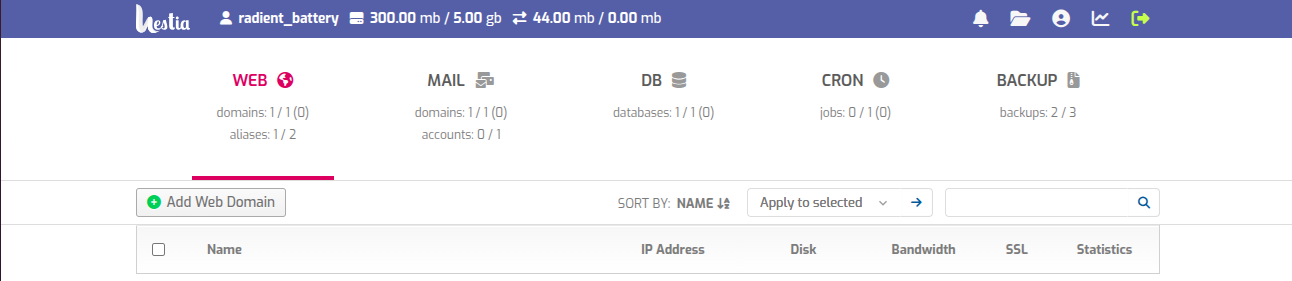
After clicking on 📁 icon, you will get initial file structure.
Go to the web ⟶ your domain ⟶ public_html and get your files working space.
# Access Database
To access your database, click on the DB icon then phpMyAdmin or Click Here
Now you will get login interface, enter your Username and Password to access database.
# Get Backups
To manage your backups, navigate to the Backups tab.
Click the Create backup button.
A popup will be shown with the following message:
Task has been added to the queue. You will receive an email notification when your backup is ready for download.
Downloading a backup
Hover over the backup you want to download.
Click the Download icon on the right of the backup’s filename.
If the backup is stored on a remote server, the file is downloaded to the server and you will get notified by email when the download is available.
# Access Account settings
To access your account settings, click the user button in the top right.
The password requirements are as follows:
- At least 8 characters, 14 or more are recommended.
- At least 1 number.
- At least 1 capital letter and 1 lowercase letter.
If you want to generate a secure password, you can use 1Password’s generator.
We are using open-source software that is built by passionate people from around the world. This means that the code is reviewed by multiple people and that anybody can contribute to it! Hestia is made with ease of use in mind. Creating a user or a website is as easy as clicking a button and filling out a couple of fields, while advanced features are easily accessible.